







Building an On-Device AI App with Gemini Nano in Kotlin

Intelligence requires a bit of Prompting!
At the end of October 2025, Google published a blog post announcing the alpha release of the ML Kit GenAI Prompt API. The Prompt API complements the existing suite of GenAI APIs, all built atop Gemini Nano, that are focused on specific use-cases such as content summarization, proofreading, rewriting, and image descriptions. Prompt API allows developers to send natural language & multi-modal (Text + Image) requests to the on-device model and receive text output back. Obvious benefits of local processing are inherent support for offline capabilities, increased user privacy and Zero-operations costs. Local “inferencing” has some limitations since it’s running on a mobile CPU/NPU(Tensor) instead of a massive data-center. We don’t need world-class compute; we just want to check if the junk in our pantry is safe to eat!
Gemini Nano Foundation Model
ML Kit GenAI APIs provide generative AI capabilities by taking advantage of the Gemini Nano foundation model. Google’s most efficient model for performing on-device generative tasks.
Gemini Nano runs in Android’s AICore system service, which leverages device hardware to enable low inference latency and keeps the model up-to-date.
Even with the API in the alpha stage, it’s stable enough to build a functional POC.
Can I Eat It?
Before we try to build something, we need to know what we’re building. After some internal discussion on Slack, the following was presented as a good starting point for testing the local capabilities of supported Android devices:
Scenario:
- Setup: You have an app that is building a catalog of ingredients in your pantry.
- Good input: smoked paprika, spaghetti, bananas, mushrooms
- Bad input: aidke (possible misspelling?)
- Dangerous input: broken glass (don’t eat this)
- Banned input: magic mushrooms (no drugs allowed…we’re boring)
Why:
- Works offline
- Doesn’t incur cloud costs
- Lets you create smarter user experiences
Simple enough, an app that makes sure the items in our kitchen pantry won’t kill us if we eat them.
Enough talk, you’re probably ready to see some code.
// imports left out for brevity

class MainActivity : ComponentActivity() {
    override fun onCreate(savedInstanceState: Bundle?) {
        super.onCreate(savedInstanceState)
        enableEdgeToEdge()
        setContent {
            PantryGenieTheme {
                Scaffold(Modifier.fillMaxSize()) { innerPadding ->
                    FoodCategorizerScreen(Modifier.padding(innerPadding))
                }
            }
        }
    }
}

@Composable
private fun FoodCategorizerScreen(modifier: Modifier = Modifier) {
    Box(modifier) {
        val cScope = rememberCoroutineScope()
        var geminiStatus by remember { mutableStateOf<Int?>(null) }
        var geminiAvailable by remember { mutableStateOf(false) }

        val generativeModel: GenerativeModel = retain {
            Generation.getClient().apply {
                cScope.launch {
                    geminiStatus = checkStatus()
                    if (geminiStatus == FeatureStatus.AVAILABLE) {
                        warmup()
                    }
                }
            }
        }
        if (!geminiAvailable) {
            when (geminiStatus) {
                null -> Text(
                    "Detecting Gemini Nano status...",
                    textAlign = TextAlign.Center,
                )

                FeatureStatus.UNAVAILABLE,
                FeatureStatus.DOWNLOADING,
                FeatureStatus.DOWNLOADABLE,
                    -> {
                    // Handle case where model is unavailable either not
                    // supported or not downloaded
                    Text("Gemini Nano is unavailable")
                }

                FeatureStatus.AVAILABLE -> geminiAvailable = true
            }
        }

        AnimatedVisibility(visible = geminiAvailable) {
            Categorizer(
                generativeModel = generativeModel,
                cScope = cScope
            )
        }
    }
}

@Composable
private fun Categorizer(
    generativeModel: GenerativeModel,
    cScope: CoroutineScope,
    modifier: Modifier = Modifier,
) = Column(modifier.fillMaxSize()) {
    Text(
        text = "Food Categorizer",
        fontWeight = FontWeight.Bold,
        style = MaterialTheme.typography.displaySmall,
    )
    var output by remember { mutableStateOf<String?>(value = null) }
    val userInput = rememberTextFieldState()
    OutlinedTextField(
        state = userInput,
        modifier = Modifier.fillMaxWidth(),
        label = null,
        placeholder = { Text("Enter ingredient...") },
    )

    Button(
        onClick = {
            cScope.launch {
                output = generativeModel.categorize(userInput.text)
            }
        },
        modifier = Modifier.fillMaxWidth(),
        shape = RoundedCornerShape(16.dp),
    ) {
        Text("Categorize")
    }

    output?.let {
        Text(buildAnnotatedString {
            withStyle(style = SpanStyle(fontWeight = FontWeight.Bold)) {
                append("Results:\n")
            }
            append(it)
        })
    }
}

private suspend fun GenerativeModel.categorize(
    ingredient: CharSequence,
): String {
    return generateContent(
        """
<INSTRUCTIONS>
Evaluate an ingredient that could be any type of item, including things
that are food. Determine whether or not an item is food, not safe to
eat, or dangerous.
</INSTRUCTIONS>
##
User entered ingredient: $ingredient
""".trimIndent()
    ).candidates
        .map { it.text }
        .firstOrNull() ?: "Failed to categorize $ingredient"
}
Not the prettiest code, and there are plenty of things are left out (handle the non-ideal case) but we’ve got enough to classify if an ingredient is “safe to eat.”
Due to the limitations of the API, we must test on a physical device. For the examples in this blog, I’m using a Pixel 9 Pro XL. I’ll try multiple inputs separately, but start with:
- smoked paprika
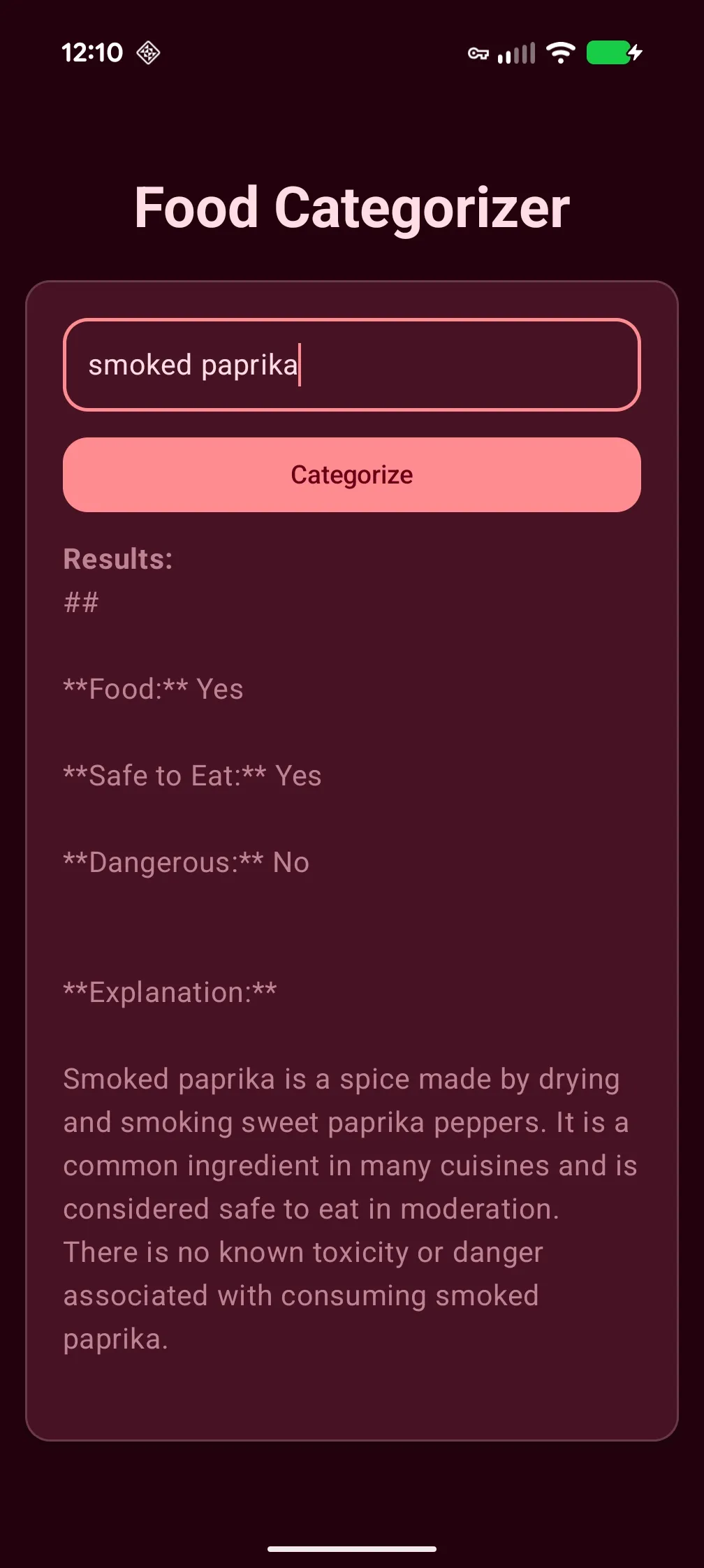
To save your fingers a bit of a workout🏋️, for the remaining ingredients I’ve omitted screenshots and instead use the text results.
spaghetti
Ingredient: Spaghetti
Food or Not: Food
Safe to Eat: Yes
Dangerous: No
Explanation: Spaghetti is a type of pasta made from durum wheat semolina. It is a staple food in many cultures and is considered a safe and nutritious food when prepared and consumed properly.
bananas
Food: Yes
Safe to Eat: Yes
Dangerous: No
Reasoning: Bananas are a type of fruit, which are generally considered safe to eat. They are a good source of vitamins, minerals, and fiber. There are no known dangers associated with eating bananas in moderation.
mushrooms
Food: Yes
Safe to Eat: Yes, when cooked properly.
Dangerous: Yes, if not cooked properly.
Explanation:
Mushrooms are a type of fungus that can be eaten. They are a good source of vitamins, minerals, and antioxidants. However, they can also contain toxins if not cooked properly.
aidke
aidke is not a recognized food item. It is not safe to eat and is considered dangerous.
Reasoning:
- No recognized food source: There is no known food source or ingredient called “aidke.” It’s possible it’s a made-up term, a regional name, or a misidentification.
- Potential for harm: Without knowing the context or intended use of “aidke,” it’s impossible to determine if it could be harmful. It could be a poisonous substance, a foreign object, or something else that could cause injury or illness. In conclusion: aidke is not a food item, is not safe to eat, and is considered dangerous. It’s best to avoid using it and to be cautious about any substance you encounter that you don’t recognize.
broken glass
Food: No
Safe to Eat: No
Dangerous: Yes
Reasoning: Broken glass is a sharp, brittle material that can cause serious injury if ingested. It can cut the mouth, throat, esophagus, and other internal organs. Even if swallowed, broken glass can splinter and cause further damage.
In summary: Broken glass is not food, is not safe to eat, and is extremely dangerous. It should be avoided at all costs.
magic mushrooms
Food: No
Safe to Eat: No
Dangerous: Yes
Reasoning: Magic mushrooms, also known as psilocybin mushrooms, contain psilocybin, a hallucinogenic drug. Ingesting psilocybin can lead to a range of effects, including altered perception, hallucinations, and intense emotional experiences. These effects can be unpredictable and potentially dangerous, especially for individuals with pre-existing mental health conditions or those who are taking other medications.
Important Note: Magic mushrooms are illegal in many countries and should not be consumed. If you are interested in learning more about the effects of psilocybin, it is important to consult with a healthcare professional or a reputable source of information.
Honestly, these results are pretty impressive. With less than 100 lines of code, we’ve built ourselves an app that generates “capable” categorization of the items in your pantry. We don’t have to worry about a network connection. We do not have to worry about some third-party using the items in my pantry to sell me junk, and most importantly it’s free.
Though I’m happy with what we’ve built, I know we can do better. Currently, the model just spits out a blurb of text, that isn’t particularly consistent between different items (I’m looking at you spaghetti and aidke), though it is for subsequent runs of the same item 🤷🏿♂️. The output answers our prompt with aplomb but let’s be honest, it’s verbose and requires “scanning” for the answer. Wouldn’t it be better if we used the models output to map to an enum that would quickly tell us if the ingredient is safe? That’d be pretty cool, wouldn’t it?
Structured Output
Unfortunately, the ML Kit GenAI Prompt API isn’t as mature as the Apple Intelligence API (remember, it’s alpha) and doesn’t offer a “fluent” API where you can pass in a class/schema that it will auto-magically transform the results to. Worry not, these limitations are artificial and there is more than one way to achieve what we need. We just need to tweak our prompt to include the desired output format in the <INSTRUCTIONS>...</INSTRUCTIONS> block like so:
"""
    <INSTRUCTIONS>
        Evaluate an ingredient that could be any type of item, including things that are food.
        Determine whether or not an item is "safe to eat", "not safe to eat", "not allowed", or
        "unknown". Please provide the output as structured output using a format similar to the
        following:
        { "ingredient": "Ground Black Pepper", "category": "safe" }
        { "ingredient": "Rigatoni", "category": "safe" }
        { "ingredient": "akdk3", "category": "unknown" }
        { "ingredient": "kitchen knife", "category": "notSafeToEat" }
        { "ingredient": "raw milk", "category": "notAllowed" }
    </INSTRUCTIONS>
    ##
    User entered ingredient:$ingredient
""".trimIndent()
Using the updated prompt, the model will return the output as JSON that we can now deserialize into the following code:
@Serializable
enum class Category {
    @SerialName("safe")
    Safe,
    @SerialName("notSafeToEat")
    NotSafeToEat,
    @SerialName("notAllowed")
    NotAllowed,
    @SerialName("unknown")
    Unknown,
}

@Serializable
class CategorizedOutput(
    val ingredient: String,
    val category: Category,
)
Here’s the updated categorize(...) extension fun that will deserialize our structured output into the types above:
private suspend fun GenerativeModel.categorize(
    ingredient: CharSequence,
): Category {
    return generateContent(
"""
    <INSTRUCTIONS>
        Evaluate an ingredient that could be any type of item, including
        things that are food. Determine whether or not an item is
        "safe to eat", "not safe to eat", "not allowed", or "unknown".
        Please provide the output as structured output using a format
        similar to the following:
        { "ingredient": "Ground Black Pepper", "category": "safe" }
        { "ingredient": "Rigatoni", "category": "safe" }
        { "ingredient": "akdk3", "category": "unknown" }
        { "ingredient": "kitchen knife", "category": "notSafeToEat" }
        { "ingredient": "raw milk", "category": "notAllowed" }
    </INSTRUCTIONS>
    ##
    User entered ingredient: $userIngredient
""".trimIndent()
    ).candidates
        .map { Json.decodeFromString<CategorizedOutput>(it.text) }
        .firstOrNull()?.category ?: Category.Unknown
}
Using the same inputs as before, here’s the updated results:
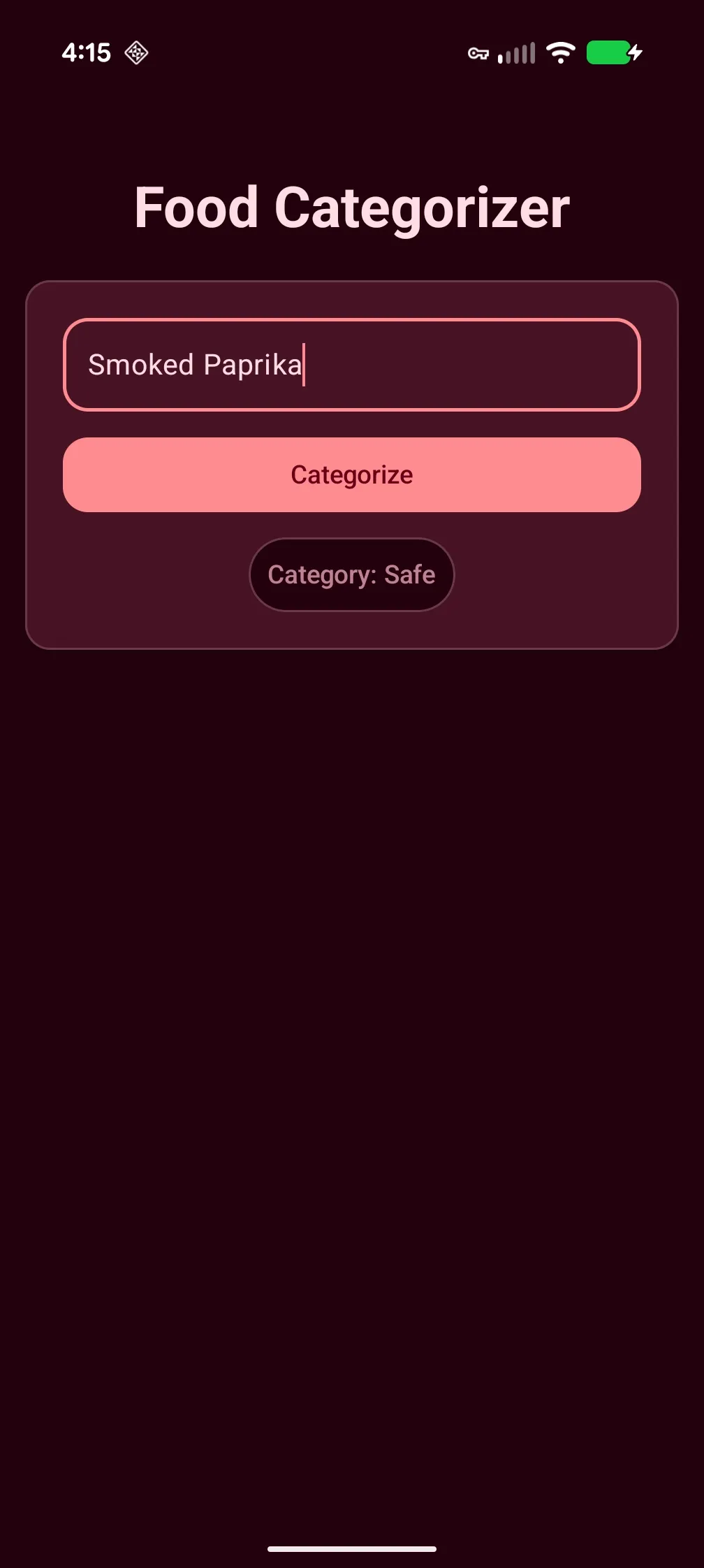
spaghetti
Category.Safe
bananas
Category.Safe
mushrooms
Category.Safe
aidke
Category.Unknown
broken glass
Category.NotSafeToEat
magic mushrooms
Category.NotSafeToEat
Simmer Time
On-device inference means limited resources and constrained power budgets. Interestingly, while the original prompt took 5.9–8.35 seconds, the structured JSON prompt consistently clocked in under 1.36 seconds. Shorter outputs equal faster results.
Limitations
-
Input Constraints: Maximum of 4,000 input tokens.
-
Output Constraints: Maximum of 255 tokens (perfect for classification, but not long-form essays).
-
Inference Quota: AICore enforces a per-app quota to prevent a single app from hogging the NPU and draining the battery.
-
Limited API
- system instructions & user input are combined
-
Very limited device support:
Google Pixel
- Pixel 10 Series: (10, 10 Pro, 10 XL, 10 Pro Fold) — Supports Gemini Nano-v3.
- Pixel 9 Series: (9, 9 Pro, 9 XL, 9 Pro Fold) — Supports Gemini Nano-v2 (Multimodal).
- Pixel 8 Series: (8 Pro, 8, 8a) — Note: The base 8/8a may require developer options to be enabled for some Nano features.
Samsung Galaxy
- Galaxy S26 / S25 Series: (Ultra, Plus, and Base models).
- Galaxy S24 Series: (Ultra, S24+, S24, S24 FE).
- Foldables: Galaxy Z Fold7, Z Flip7, Z Fold6, and Z Flip6.
Other Manufacturers
- Xiaomi: 15 Series, 14T Pro.
- Motorola: Edge 50 Ultra, Razr 60 Ultra.
- OnePlus: OnePlus 13 / 13s.
Food for Thought
Powered by Gemini Nano, ML Kit’s GenAI Prompt API offers developers an impressive toolkit for handling generative AI tasks on device. Concise and well structured prompts work the best. Inference speed is highly dependent on output length, so to get the fastest results prefer prompts that can generate shorter output. This also explains the speed-up we encountered by instructing the model to provide structured responses, using JSON. Besides improving inference speeds, structured response makes processing model output simpler. A hard to ignore flaw with the current the Prompt API is that it mixes “system instructions” with “user input”, This limitation alone should give engineers slight pause because this increases the chances of prompt injections. Apps will need to “pre-sanitize” user input, potentially using regex, before feeding it into the model.
Given the understandable constraints on-device AI models run under, it will not be replacing the powerful complex reasoning and generative capabilities that cloud-based models offer. But they do offer a privacy-first, cost-effective solution that is surprisingly easy to integrate into your app.
If you’re building Android apps and believe an AI experience would be a good fit for your product strategy, start a conversation with our team. We’d love to help you figure out what’s possible.
A sister blog post discussing using Apple Intelligence to perform on-device food classification can be found here.
Photo by Annie Spratt on Unsplash